Download original PDF · Plain-text extract
Every original page is reproduced below, including all illustrations, tables and labels. Select a page image to open it at full resolution. Expand Text for copying and search below a page to read its extracted text; extraction may change spacing or special characters.
Page 1
Text for copying and search
FF-OI-04:  “Submenu  buildings  widget”
Rev(
02)

Feldfeste  Operation  Instruction
 FF-OI-04:  “Submenu  buildings  widget”    Document  History   Revision  Content  Editor  Time  01  Initial  Document  Creation  Arina  03.05.2026  02  Formal  update  Arina  25.05.2026
Confidential  Operation  Instruction
Page 2
Text for copying and search
FF-OI-04:  “Submenu  buildings  widget”
Rev(
02)

Table  of  Contents  1.  Instructions  for  the  submenu  buildings     Purpose  of  this  document  Targets:  ●  Explain  building  submenu  architecture  and  data  flow  ●  Explain  page  manager  architecture
●

Clarify

how

UI

pages,

tags,

and

spawn

classes

connect

Confidential  Operation  Instruction
Page 3
Text for copying and search
FF-OI-04:  “Submenu  buildings  widget”
Rev(
02)

1  Instructions  for  the  submenu  buildings  Path:  E:/UnrealProjects/Feldfeste/Castellum/Content/CA_Code/Blueprints/Widgets/Master
Widget/Menu/BP_Submenu_Buildings.uasset
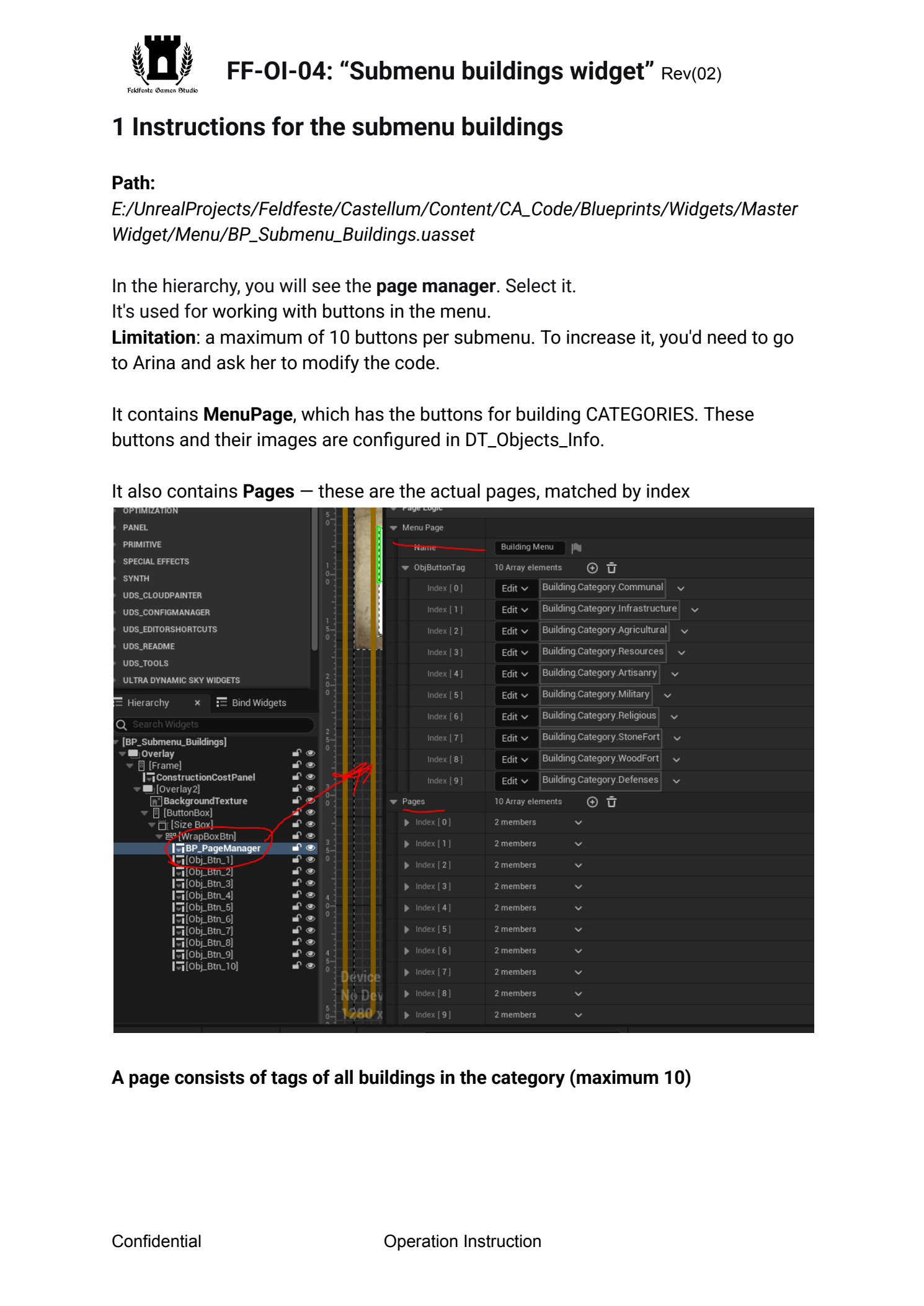
  In  the  hierarchy,  you  will  see  the  page  manager . Select  it.  It's  used  for  working  with  buttons  in  the  menu.   Limitation :  a  maximum  of  10  buttons  per  submenu.  To  increase  it,  you'd  need  to  go
to

Arina

and

ask

her

to

modify

the

code.
  It  contains  MenuPage ,  which  has  the  buttons  for  building  CATEGORIES.  These
buttons

and

their

images

are

configured

in

DT_Objects_Info.
  It  also  contains  Pages  —  these  are  the  actual  pages,  matched  by  index
  A  page  consists  of  tags  of  all  buildings  in  the  category  (maximum  10)
Confidential  Operation  Instruction
Page 4
Text for copying and search
FF-OI-04:  “Submenu  buildings  widget”
Rev(
02)

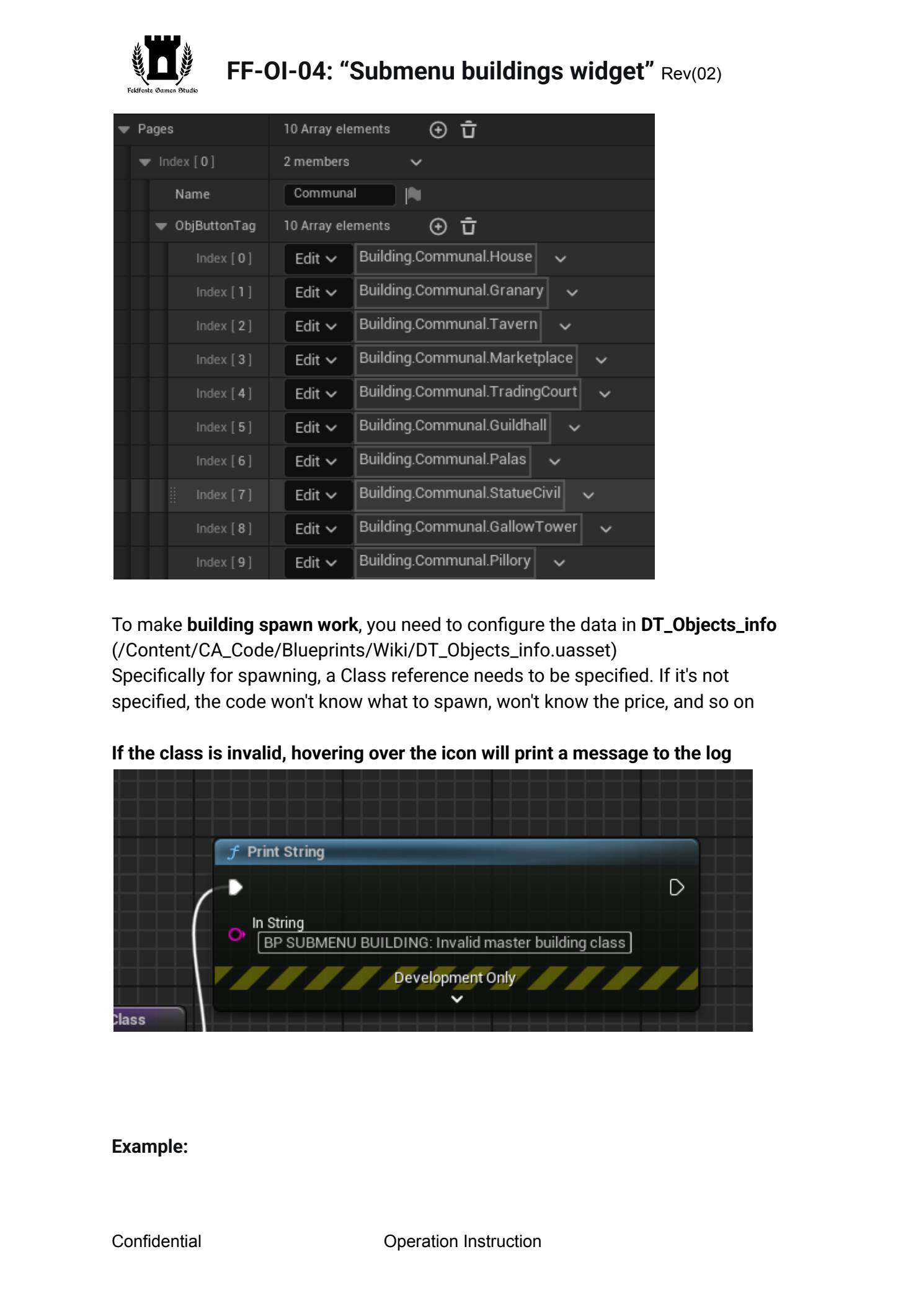
  To  make  building  spawn  work ,  you  need  to  configure  the  data  in  DT_Objects_info   (/Content/CA_Code/Blueprints/Wiki/DT_Objects_info.uasset)  Specifically  for  spawning,  a  Class  reference  needs  to  be  specified.  If  it's  not
specified,

the

code

won't

know

what

to

spawn,

won't

know

the

price,

and

so

on
  If  the  class  is  invalid,  hovering  over  the  icon  will  print  a  message  to  the  log

Example:
Confidential  Operation  Instruction
Page 5
Text for copying and search
FF-OI-04:  “Submenu  buildings  widget”
Rev(
02)

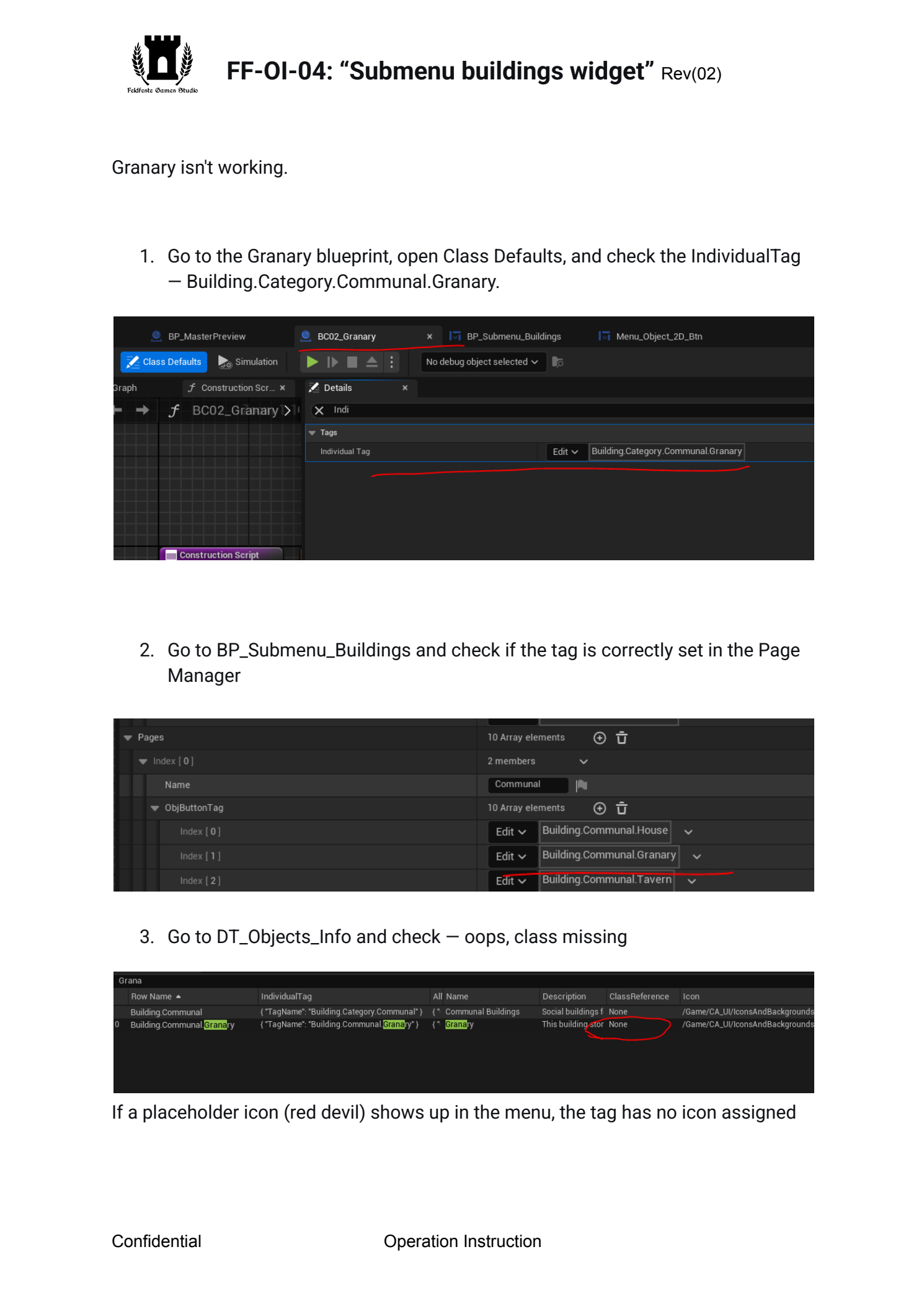
Granary  isn't  working.

1.  Go  to  the  Granary  blueprint,  open  Class  Defaults,  and  check  the  IndividualTag
—

Building.Category.Communal.Granary.


2.  Go  to  BP_Submenu_Buildings  and  check  if  the  tag  is  correctly  set  in  the  Page
Manager

3.  Go  to  DT_Objects_Info  and  check  —  oops,  class  missing
 If  a  placeholder  icon  (red  devil)  shows  up  in  the  menu,  the  tag  has  no  icon  assigned
Confidential  Operation  Instruction