Download original PDF · Plain-text extract
Every original page is reproduced below, including all illustrations, tables and labels. Select a page image to open it at full resolution. Expand Text for copying and search below a page to read its extracted text; extraction may change spacing or special characters.
Page 1
Text for copying and search
FF-OI-12:  “  Merging  Branches”
Rev01

Feldfeste  Operation  Instruction

FF-OI-12:  “Merging  Branches”
Document  History   Revision  Content  Editor  Time  01  Initial  Document  Creation  Hannes  03.07.2026
Confidential  Operation  Instruction
Page 2
Text for copying and search
FF-OI-12:  “  Merging  Branches”
Rev01

Table  of  Contents  1.  Basic  Setup  2.  Process

1.  Basic  Setup
This  process  is  necessary  to  bring  your  changes  to  the  main  branch.  We  split  in  branches  to
make

sure

conflicts

are

resolved

and

unwanted

changes

are

removed.
  You  have  changes  on  your  local  branch.  These  are  reviewed  by  the  manager  and  need  to  be
merged

into

main.
  Make  sure  you  follow  the  instructions  ( FF  OI  05 )  to  install  the  build  and  set  up  yourself  as
developer

with

access

to

the

repository

on

github.

I

am

using

Github

Desktop

for

local

front

end

management.

2.  Process
1.  Merge  main  into  your  branch;  except  for  your  intentional  changes.
This

will

make

sure,

nothing

is

overwritten

with

older

variants

or

dirty

edits

from

your

branch.

A

dirty

edit

is

an

unintended

change;

even

if

it

does

not

effectively

change

logic,

it

is

change

for

the

build,

and

per

se

unwanted.

Older

Variant

means,

your

change

is

not

up

to

date

with

other

branches

or

main,

and

would

overwrite

other,

more

recent

and

higher

priorized

changes,

effectively

removing

work

effort

and

progress.
 2.  Open,  compile  and  test  your  changes  for  functionality.  Close  the  editor.  3.  Discard  any  dirty  edits  from  your  commit.  4.  Add  a  proper  description.  Push  the  commit
3.  Some  additional  information

Confidential  Operation  Instruction
Page 3
Text for copying and search
FF-OI-12:  “  Merging  Branches”
Rev01

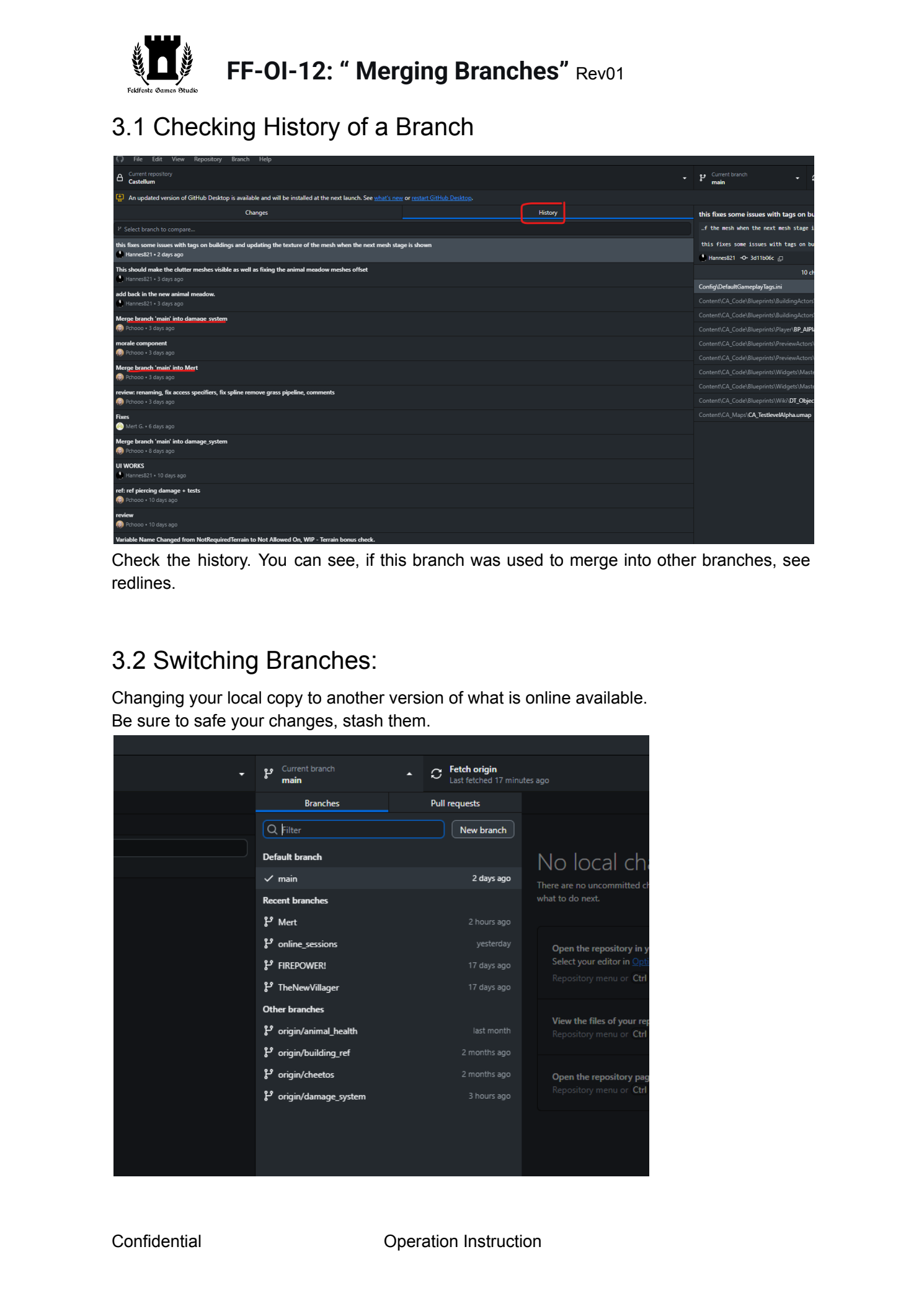
3.1  Checking  History  of  a  Branch
 Check  the  history.  You  can  see,  if  this  branch  was  used  to  merge  into  other  branches,  see
redlines.

3.2  Switching  Branches:
Changing  your  local  copy  to  another  version  of  what  is  online  available.
Be

sure

to

safe

your

changes,

stash

them.


Confidential  Operation  Instruction
Page 4
Text for copying and search
FF-OI-12:  “  Merging  Branches”
Rev01


3.3  Fetching  the  latest  Updates  from  the  web
 Always  work  with  the  latest  version  of  branches  to  make  sure  you  do  not  run  into  bad
surprises,

like

suddenly

overwriting

on

merge

by

a

conflict

you

did

not

see!

This

could

break

the

branch

functionally.

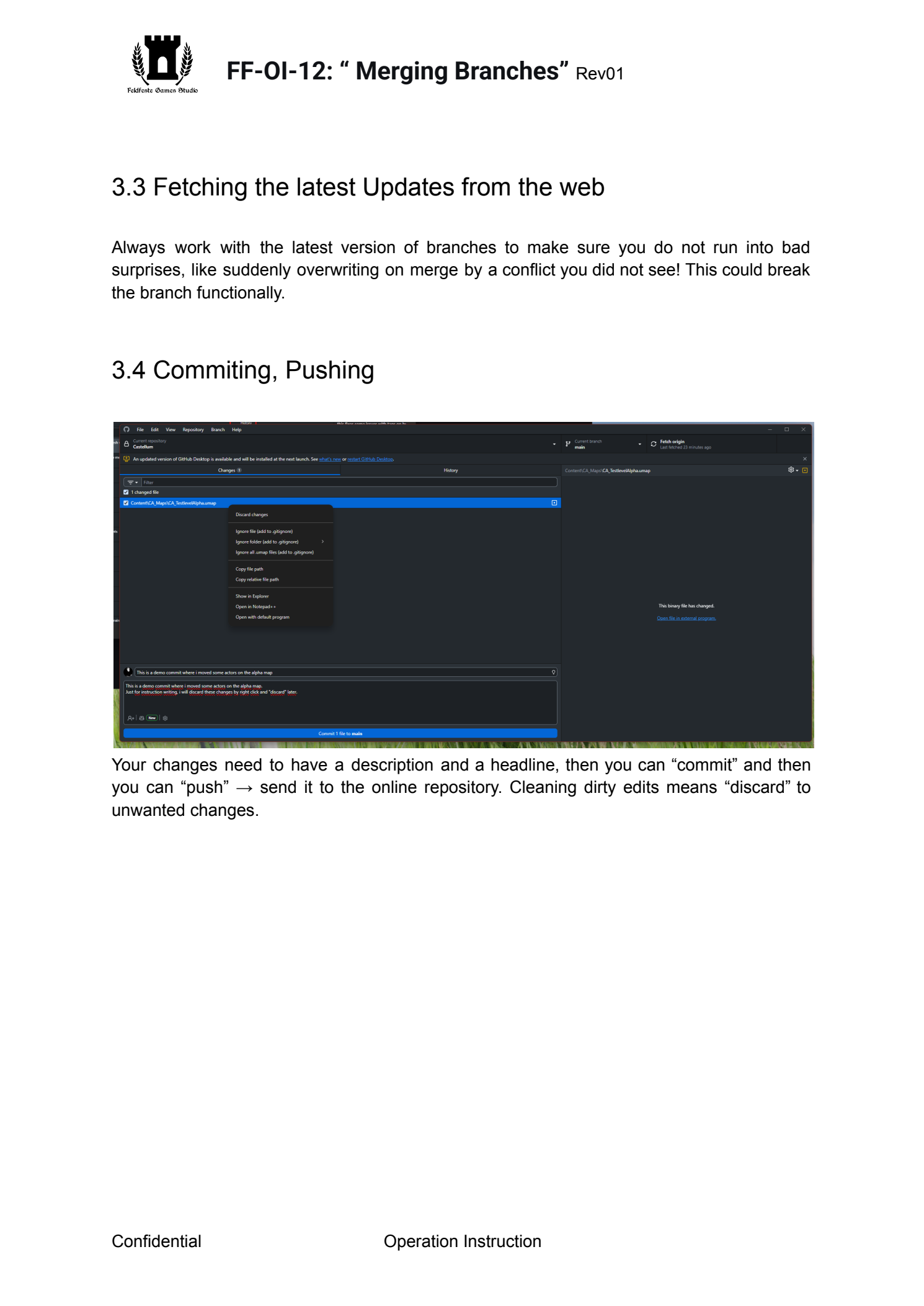
3.4  Commiting,  Pushing

 Your  changes  need  to  have  a  description  and  a  headline,  then  you  can  “commit”  and  then
you

can

“push”

→

send

it

to

the

online

repository.

Cleaning

dirty

edits

means

“discard”

to

unwanted

changes.

Confidential  Operation  Instruction